
What's new in Daybridge
Keep up to date with the latest features and improvements we're shipping.
Daybridge in your Mac's menu bar
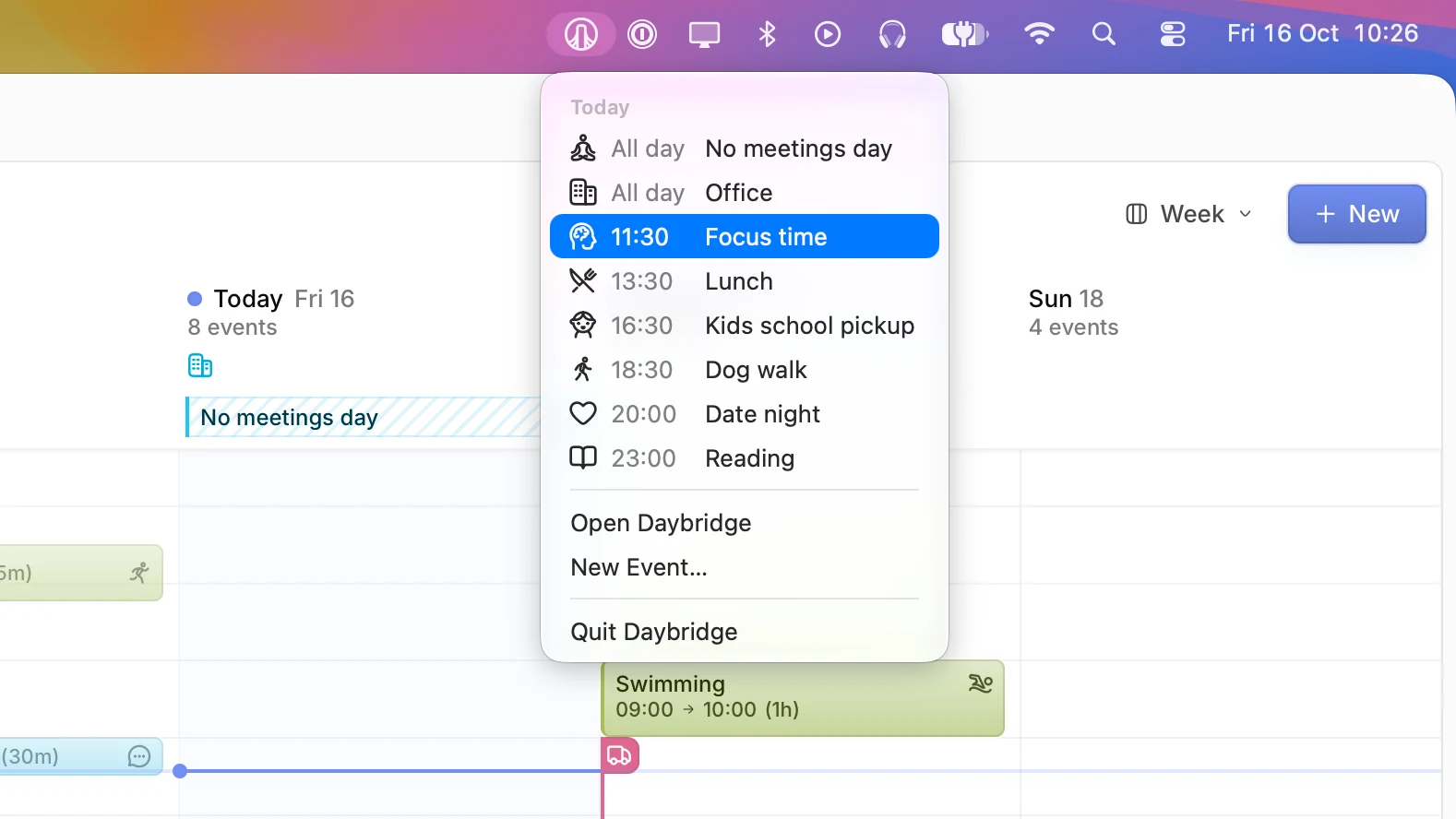
On Mac, a countdown beside the Daybridge icon in the menu bar shows how long you have until your next event. Click it to see the rest of today's events, or tomorrow's once today is done. Open an event, join a call that has started, or create a new event without switching windows. Closing the window now keeps Daybridge running, so the menu bar stays up to date.
Improvements3
- On desktop, create an event, a calendar, or a calendar subscription, and move between dates, from the app's menus
- The desktop app does less work while you use it, so it feels quicker
- Calendars paused because an account needs a paid plan or is missing permissions stay in the sidebar, and their events are hidden
Fixes5
- A new event takes the area of the calendar you choose for it
- The first occurrence of a new repeating event no longer sends the same reminder twice
- Editing "this and future" events in a Google, Outlook, or iCloud series keeps their areas, tags, and alerts
- Repeating events that end on a set date no longer show an extra occurrence west of UTC
- Google Calendar events that repeat on a list of dates show every date
Import events from ICS files
Bring events into Daybridge from an ICS file, like an invitation attached to an email or an export from another calendar. On the web, drag the file anywhere onto Daybridge. On desktop, choose File > Import, or right-click the file and open it with Daybridge.
Improvements2
- On desktop, set Daybridge as your default calendar app from the Daybridge menu, so calendar links and ICS files open in it
- On desktop, Search and Send Feedback are in the menu bar
Calendar subscriptions
Add any calendar that has a link, such as public holidays, a school timetable, or F1 races, and Daybridge keeps it up to date alongside your other events. Calendars you subscribe to in a connected iCloud account appear automatically.
Improvements4
- Add a calendar subscription to a shared calendar so everyone in it sees its events
- Show week numbers in any tab
- An improved way for administrators to approve Daybridge access to Microsoft Outlook
- (Web & Desktop) On Mac, create an event from the Dock menu, and the window's colours fade while another app is in front
Fixes10
- (Android) Quick Add is no longer covered by the keyboard
- Links in event descriptions always appear tappable, and open straight away
- (iOS and Android) Call links no longer ask for confirmation so often
- (Web & Desktop) Event details open beside the event again
- (Web & Desktop) Back-to-back events no longer nest under each other in the timeline
- (iOS) Swiping from the edge goes back from event details and settings
- (iOS) Event durations account for daylight saving time changes
- (iOS) Start and end time fields no longer accept more than four digits, or crash in rare cases while typing
- (iOS and Android) The all-day events bar in the timeline responds to horizontal swipes, and no longer shows extra empty space
- (iOS) The bottom bar no longer overlaps the contacts screen when it shows many contacts on iOS 26 or newer
A fresh look for sign-up
We redesigned sign-up on web, desktop, iOS, and Android, with a fresh look and clearer wording at every step.
Improvements3
- (iOS and Android) No limit on the number of timeline days shown at once on narrower devices
- (Web & Desktop) Events from connected accounts that run from midnight to midnight show as all-day
- (Web & Desktop) Send a copy of your app data with feedback, to help us look into a problem
Fixes9
- (iOS and Android) All-day event notifications show the right date
- (iOS and Android) Custom time zones, and changes to them, are saved
- (iOS and Android) Invitations from connected accounts appear in the Updates tab, with a button to respond
- (iOS and Android) The offline warning no longer appears briefly right after opening the app
- (Android) Sign-in links from email work when the app had been closed
- (Web & Desktop) Signing in by email on desktop no longer hangs on the way back from the browser
- (iOS) Timeline settings are no longer cut off on smaller iPhones
- (Android) Tapping the back button no longer crashes the app in very rare cases
- (iOS and Android) Sync is more reliable
An extra large Up Next widget
The Up Next widget comes in an extra large size on iOS 27, and scrolling the timeline is smoother.
Improvements2
- Scrolling up and down in the timeline is less likely to move to another day by accident
- A message explains when an event can't be created or duplicated because no calendar is available to save it to
Fixes1
- Toolbar buttons no longer appear bright white in dark mode on iOS 26 and 27
Fewer dead ends when creating events
Daybridge now explains when an event can't be created or duplicated because no calendar is available to save it to, where it used to leave you on a screen that couldn't be tapped.
Fixes1
- A blocked out invitation in the timeline no longer crashes the app
Outlook calendars
Connect a Microsoft Outlook account to see all your events in one place, with the same read-write sync as other connected accounts. This even includes Outlook calendars your colleagues have shared with you.
A richer Next Event widget
The Next Event widget on iOS shows more of what's coming: a larger icon, plus indicators for calls, participants, and tags.
Improvements6
- (iOS) Press and hold a task in the list to mark it complete or incomplete
- Declined events are easier to spot in the list
- New hiking and thought bubble icons for events, areas, tags, locations, and time zones
- (Android) Short timeline events are easier to read and distinguish
- (iOS) Design and VoiceOver improvements in settings
- (iOS) Improved compatibility with iOS 27
Fixes2
- (iOS) The delete option is back when pressing and holding an event in the list
- (Android) The tab options sheet closes smoothly when dragged
Timeline events, redrawn
Timeline events were redrawn to match web and desktop. They're clearer when space is tight, and carry more: locations, people, calls, and reminders, with invitations you haven't answered clearly marked.
Improvements2
- Events spanning several days show their end time in the list
- Time zone search is faster and covers more cities
Fixes3
- Time zones no longer sit under the wrong country, or pick up stray apostrophes in some city names
- The calendar and area pickers no longer refuse taps, or fail to load, in rare situations
- (iOS) Leaving the app while a large sync runs no longer crashes it
Reminders in minutes, hours, days, or weeks
It's now easier to set event reminders: choose a number and a unit, whether that's ten minutes before a call or two weeks before a birthday.
Improvements2
- Send us an idea, a bug, or anything confusing, straight from settings
- (Android) Minor performance improvements across the app
Fixes4
- (iOS) The app no longer crashes at launch on iOS 18
- Unavailable calendars no longer look available when creating or editing an event
- The declined events tab filter works again
- (Android) Widget previews follow the device language
Choose your days on bigger screens
On iPad and Android tablets, the timeline now lets you choose how many days sit side by side.
Improvements2
- Events sync faster, especially the first time you sign in
- The single-day timeline shows how many events your filters are hiding
Fixes6
- The tab you pick stays on this device, without switching web or desktop to match
- (iOS) Jump to today works in the list layout again
- (iOS) Switching from the timeline to the list opens the day you were on
- (iOS) Event widgets no longer show up empty
- (iOS) Widget previews appear in German on German devices
- Quick Add says when it couldn't work out a title, and long calendar names are no longer cut short in the preview
A cleaner month view
The month view has a cleaner design, with more room for the events in it. All-day markers now show as icons along the top of each day, dates sit in the corner, and the start of a new month reads as a soft step through the grid.
Happening right now
An event that's under way carries a highlight ring, on the timeline and in the calendar, so whatever you're in the middle of stands out from the rest of the day.
Improvements8
- Cancelled and declined events, and tasks you've completed, are easier to tell apart from everything still ahead
- Choose how the week lines up when you jump to today or to a date: starting on your first day of the week, or starting today
- Each device keeps its own tab, so signing in somewhere else no longer changes the view in front of you
- Duplicate a tab from its menu, the way you already can on iPhone and Android
- Right-click a marker for its options, and when a day holds more than fit, open the rest in a list you can drag onto another day
- A calendar's reminders can go back to your account defaults, which are now shown next to them
- The sign-in window now opens as soon as you arrive signed out, with a fresh design
- Move to annual billing from your subscription settings
Fixes10
- Signing in successfully no longer shows an error as well
- The account setup window no longer reappears for accounts already set up
- Times you type are kept when you click away, as well as when you press Enter
- Starting a new event while editing another keeps what you'd already typed
- An event sitting entirely behind another can be resized again, from anywhere along its edge
- An event running past midnight now offers the next day's times when you set when it ends
- Calendars can be dragged into a different order again
- Dragging an all-day event over the dates no longer gives it a start and end time
- A saved location you removed can be added again
- Subscribing part way through signing up returns you to the step you were on, rather than starting you again
A new look for signing in
Improvements4
- Signing into Daybridge has a brand new look
- (iOS) Choose an event's area from Quick Add
- (Android) Improved haptic feedback across the app
- Improvements to speed, performance, and event sync reliability
Fixes4
- An event's title is no longer lost when saving changes
- The paw and voting icons are back in the icon picker
- (Android) Timeline markers are the right size, and dimmed once they're in the past
- (iOS) Past timeline markers are dimmed
Pinch to zoom the timeline
Pinch the timeline to set how tall an hour is. Spread it out and events grow, showing more of their details. Pinch it back in and more of the day fits on screen at once.
Improvements5
- (Android) Timeline events show more information at once
- (Android) The People and Settings tabs make better use of larger screens
- (Android) A launcher shortcut for searching events
- (iOS) Search events from the home screen icon's quick actions
- Faster event loading in the Home tab
Fixes5
- Repeating events on the 31st, or on 29 February, no longer vanish from later dates
- Links in event descriptions open properly again
- Sync no longer gets stuck and in need of a resync
- (Android) The active tab no longer resets when folding or unfolding a device
- (Android) Profile photos load in the people widget
Unified event composer
Quick Add and the event form became one thing. Type in plain language, then refine every detail without moving anywhere.
Everything in one place
Description, schedule, location with an inline map, call link, repeat, participants, tags, reminders, calendar, and area all sit together. The whole thing pops out to the full window, or collapses back, without losing what you've typed.
Improvements4
- Descriptions keep their links and formatting, and now appear in the details panel too
- Integrations and calendar accounts merged into one Connected accounts menu
- Rename, reorder, assign an area, fix, or disconnect an account from that one place
- Select and copy an event's title and description
Fixes3
- The times and dates you type take priority over anything inferred
- Meals and social plans get a sensible time of day rather than becoming all-day events
- Long descriptions are no longer cut short
iCloud and Fastmail event editing
The calendars that arrived read-only two weeks ago now work the way your Google calendars do: create, reschedule, edit, and delete, repeats included.
Improvements4
- Daybridge Plus is now available as a discounted annual plan
- Repeating events on iCloud and Fastmail calendars can be changed just this once, from here onwards, or every time they happen
- Calendars you can only read are marked as such, so an edit can't bounce back
- Changes reach your other devices faster
Fixes3
- Time zone names no longer truncate in the event details panel
- (iOS) Improved VoiceOver labels throughout settings
- (Web & Desktop) Deleting part of a repeating series behaves correctly on Google calendars
iCloud and Fastmail calendars
Daybridge now speaks CalDAV. Connect an iCloud or Fastmail account and your calendars arrive alongside everything else, with the same colours, the same filters, and the same week.
Improvements3
- Assign an area to a connected account's events as you connect it
- (iOS and Android) Connected accounts can be renamed from Settings
- Connect iCloud with an app-specific password, or Fastmail with a single sign-in
Fixes1
- Calendars with no colour set fall back to their area's hue
Tab-scoped widgets
Widgets can follow a single tab rather than your whole calendar, so the home screen can show work while the lock screen shows everything.
Improvements3
- Mark a task complete while looking at its details
- A faster first sync after signing in, especially with many calendars
- Clearer error messages when something goes wrong
Fixes1
- Widgets no longer show repeating events from disabled calendars
Duplicate a tab
Improvements3
- Duplicate any tab, then adjust the copy
- A clearer, simpler sign-up
- (iOS) The date picker springs open from wherever you tap
Fixes2
- Events with no title no longer appear blank in widgets, or as 'Daybridge' in notifications
- (Android) Task checkboxes are easier to see in the list
A friendlier first run
A focused pass over everything between opening Daybridge for the first time and having your calendar in front of you.
Improvements4
- Clearer, friendlier sign-up steps
- Turning on a calendar brings it online straight away
- Only the calendars you've turned on are synced
- Accounts connected after onboarding get the same guided setup
Fixes1
- A round of Google Calendar fixes for repeating events, all-day events, deletions, and replies
Timeline events, redesigned
Mobile timeline events now match web and desktop, and carry more of what an event is without being opened.
Improvements5
- Blocked-out time takes a striped background
- Markers take a more compact shape
- Past events and completed tasks are more clearly dimmed
- An indicator next to days holding events your filters have hidden
- New icons for areas, events, and tags, including bird, guitar, rollercoaster, thread, walking, and washing machine
Fixes4
- Event widgets show your events again rather than nothing
- Events ending after 11pm are no longer cut short, or missing entirely
- Notifications that could fail to arrive now arrive
- Unticking every event type in a tab's filters now sticks
New calendar canvas engine
The calendar was rebuilt on a new rendering engine. Month, week, and day layouts load and navigate far more smoothly, and cope with thousands of events without complaint.
Events that stay in sight
Events stick to the top and bottom of the view as you scroll, so you can see what sits just off-screen, and all-day events stay readable however wide they run.
Improvements6
- Redesigned events, easier to read
- A visual refresh across the month, timeline, and agenda layouts
- Dark mode colours adjusted so events stand out
- Date headers show when events are hidden by an active filter
- Search the time zone picker by city or time zone name, and pin your own to the top
- Improved keyboard navigation and screen reader support
Fixes2
- Events no longer appear a day out around time zone boundaries
- Time zone labels sit the right way up
Drag, drop, and resize on the timeline
The timeline became something you handle directly: press to preview a new event, drag it to another day, and pull its edges to change when it runs.
Improvements7
- Tap, hold, and drag to preview an event before you create it
- Drag events between days to reschedule them
- Press and hold an event to reveal handles, then drag its top or bottom edge
- Start and end times appear live as you drag
- Up to five days side by side on larger screens
- Tasks default to ten minutes
- Your own time zones are pinned to the top when choosing one for an event
Fixes3
- A new event no longer disappears when switched from all-day to a set time
- (Android) Timeline events snap to 15 minutes after a drag
- (Android) Event notifications open the event when tapped
Clock changes on the timeline
Side-by-side days, and a people widget
The timeline can show more than one day at a time on iOS, and Android has a new home screen widget for the people you contact most.
Improvements7
- (iOS) The timeline layout can show one, two, or three days at once, and you swipe through the week from there
- (iOS) Up to five days at once on larger iPads
- (iOS) The sidebar can be hidden on iPadOS
- (Android) A people widget, showing your contacts and their local time
- Smoother swiping and scrolling through events
- A loading indicator while the app syncs for the first time
- New tabs take a default name and icon from their layout
Fixes2
- The date and current time indicator keep up after the app has been left open
- (Android) Tab options no longer show details from the tab you edited last
Advanced monthly repeats
Repeating events picked up the monthly rules that were missing, like the third Thursday of the month, or the last working day.
Improvements4
- The time zone picker covers more cities, plus UTC and fixed offsets like UTC+05:00
- Cal.com call links on events
- Completed tasks are dimmed in the list
- (iOS) A dictation button in Quick Add for Daybridge Plus subscribers
Fixes2
- Quick Add no longer gets stuck when a suggested event doesn't load
- Past errors no longer reappear in Quick Add
Quick Add
Quick Add reads a sentence and builds the event. Times, places, repeats, and the right area, without touching a single field.
It knows where things belong
A dentist appointment lands in Personal and a design review lands in Work, following the areas you already use.
Improvements6
- Quick Add understands seven languages at launch
- Ask for a follow-up change to adjust the suggested event
- See a map for any event that picked up a place
- Quick Add runs on Daybridge's own infrastructure, using open-weight models, so your calendar isn't sent to a third-party AI provider
- (iOS) Dictate straight into Quick Add
- (iOS and Android) Create from a tap on empty timeline space
Fixes2
- Locations with commas no longer split into two places
- (Android) The keyboard no longer covers the suggestion row on smaller screens
A quicker, steadier calendar
A performance pass across the calendar, so moving between dates and views keeps up with you.
Fixes3
- Fewer unexpected sign-outs
- The app stays responsive while creating events
- Sync no longer stalls when something goes wrong
Filters on iOS and Android
Filters arrived on mobile and then kept growing: start from areas, and narrow by almost anything else an event carries.
Improvements5
- Filter by repeat, call link, or whether an event is all-day
- Filter by calendar, account, location, tag, or event type
- Filter by the people attending
- (iOS) Mark a task complete straight from its notification
- (Android) A time zones widget, showing the time in every city you've saved
Fixes3
- Tab area filters set on web or desktop now show correctly on mobile
- One-off all-day events no longer spill onto the following day in the list
- (Android) The Up Next widget loads again
A list that keeps going
The list layout became one continuous scroll on both platforms, with no more swiping through empty days to reach next week.
Improvements5
- (Android) A cleaner, full-width list design
- (Android) Markers and tasks show their location in the list
- Tapping the active tab opens its options menu
- A changelog link in settings
- (iOS) A smaller app download
Fixes3
- The app no longer gets stuck on the loading screen after a few days away
- Sync no longer gets caught in a loop
- All-day events no longer show the wrong date range
Hover to convert time zones
Hover an event's time to see it in your other time zones, and on a map, without opening anything.
Improvements3
- A redesigned event details screen
- A participants screen for browsing long guest lists and seeing who has replied
- Calendar details on hover
Fixes1
- Opening event details no longer crashes on certain time zones
Invitations and activity, together
The Updates tab now holds one list instead of two, with invitations and activity in the order they happened.
Improvements4
- Swipe an invitation to accept or decline it
- Related icons sit next to each other in the icon picker
- (Android) Home screen widgets, starting with today's upcoming events and a shortcut into adding a new one
- (Android) A Join call button on notifications for events with a call link
Fixes1
- (Android) Widgets no longer crash on older Android versions
New design system
Web and desktop moved onto Daybridge's new design system, with colours reworked across the app for readability and contrast.
Duplicate an event, name a time zone
Improvements4
- Duplicate any standalone event
- Give a saved time zone its own name and icon
- (iOS) Shortcuts actions to list your calendars, tabs, and tags
- (iOS) The Focus filter can now switch to a specific tab preset
Fixes2
- (iOS) Widgets no longer sign you out unexpectedly
- Calendar accounts are sorted properly when creating or editing an event
Tabs on iOS and Android
The tabs you built on web and desktop came to mobile, as a top bar you swipe between: layout, timeline hours, areas, and filters, each saved to its own tab.
Improvements1
- (iOS) The bottom tab bar collapses as you scroll
Fixes4
- Adding a time zone no longer crashes the app
- Subscription details appear in settings while subscribed
- (Android) Renaming a tab now saves
- Location details appear for events in the Home tab
Local-first sync and offline support
Daybridge now keeps your calendar on your device. Changes save the moment you make them, work with no connection at all, and appear on your other devices as soon as there is one.
Instant, then everywhere
Adding, editing, and deleting events, calendars, areas, and everything else saves the moment you do it, then reaches your other devices on its own.
Improvements4
- A wider selection of icons for events, areas, and tags
- (iOS and Android) The time zone picker groups major cities by country
- (iOS and Android) An indicator in the Home tab when you're offline or disconnected
- (iOS and Android) Resync data in settings now clears everything held locally before downloading it again
Fixes2
- Faster local storage, and a set of syncing fixes
- (iOS and Android) Notifications are no longer sent for events on disabled calendars
Multi-column timeline on Android
See up to three days side by side on the timeline, instead of one day at a time.
Fixes2
- Events use the right corner radius again
- Choosing a large profile photo no longer crashes the app
Tabs on web and desktop
Spaces became tabs. Every setting for a view now lives behind the tab itself, so a click gets you to the layout, the hours, and the filters you want.
Improvements6
- Dark mode rebuilt on a fresh colour palette
- A New event button, with a dropdown for each event type
- Translucent events, so clashes are easier to spot
- Create an event with the N key, or from the command menu
- Pick a view preset from the new tab (+) menu
- The browser tab title shows the month you're looking at
Fixes3
- All-day events are less squashed in timeline view
- Sidebar peek mode opens and closes reliably, without sticking
- Jump back to today is hidden when today is already in view
iOS 26 and Liquid Glass support
Daybridge adopted iOS 26's Liquid Glass materials across the app, from the toolbar down to the smallest control.
Improvements2
- Reduced data usage when syncing
- A view options menu in the Home toolbar for layout, timeline hours, declined events, and areas
Fixes2
- Opening the app in landscape on iPad no longer crashes
- The contacts widget looks right when home screen icons are tinted
Event search
Search across everything in your calendar, from the Home tab on mobile and from anywhere on web and desktop.
Improvements4
- (iOS) Search events with a Shortcuts action
- (Web & Desktop) Desktop notifications for upcoming events
- (iOS and Android) Event notifications now follow the reminders set on the event, its calendar, or its account
- (iOS and Android) Tags and saved locations can be reordered
Fixes3
- (Web & Desktop) The app no longer freezes on first open while a large calendar syncs
- (Web & Desktop) Desktop alerts behave properly after the machine wakes from sleep
- (iOS and Android) Custom calendar reminders now save
Daybridge Plus subscriptions
Daybridge Plus arrived as the first step towards making Daybridge sustainable, with a discounted rate for everyone who joined during early testing.
Improvements2
- Subscribe from the app on web, desktop, iOS, and Android
- New terms and conditions, and a combined privacy policy
A redesigned way in
Signing in and signing up were rebuilt on iOS and Android, and settings were reorganised to match the rest of Daybridge.
Improvements4
- Redesigned sign-in screen and sign-up steps
- Settings reorganised into clearer sections
- Choose which area a calendar account belongs to as you connect it during sign-up
- A confirmation step when the sign-in method you picked isn't the one attached to your account
Fixes3
- Repeating events no longer disappear after certain actions
- (Android) The back gesture no longer exits the app mid sign-up
- Phone number settings no longer get stuck loading
Daybridge v1
Daybridge v1 arrived on web and desktop, with new iOS and Android apps the following week. This is where the changelog begins. Everything listed here was already part of Daybridge by then.
Improvements12
- Google Calendar accounts sync both ways, including recurring events and edits to a single occurrence
- Areas group your calendars and events, and decide the colour everything takes
- Four event types: events, tasks, blocks, and markers
- Additional time zones, with names you choose, shown alongside your own
- Participants, locations, and call links on any event
- Tags and saved locations
- Contacts, and calendars shared with other people
- Notifications by push and email, with reminders set per calendar or per event
- Sign in with Google, Apple, or email
- (Web & Desktop) Filters
- (iOS) Home and Lock Screen widgets
- (iOS and Android) Invitations and activity in one place